

CONCEPT
Implementing document generation is tedious, time-consuming work
and engineers tend to avoid it
Reporting tools are usually hard to learn. Every layout tweak and every integration with internal systems adds more work.
With Docurain, all you need to create and edit documents is Excel.
ABOUT Docurain
All you need is an Excel template
and JSON or CSV data
You build the template in Excel and send the data as JSON or CSV.
You don't need specialized reporting tools or engineers who know them.
There are no servers to set up and no licenses to buy.




EXAMPLE LAYOUTS
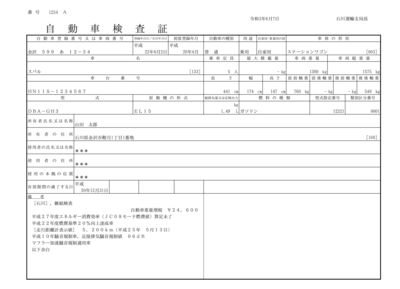
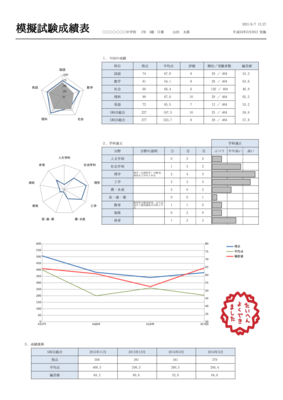
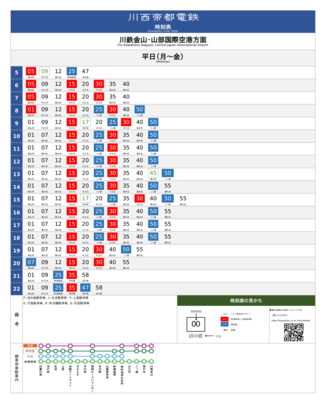
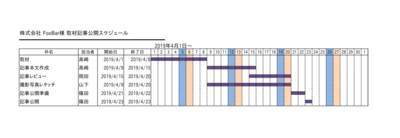
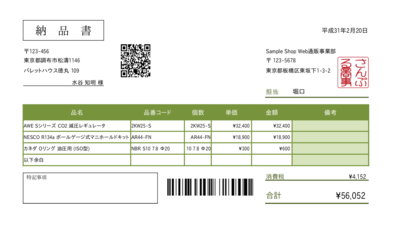
Even non-technical staff can build documents like these
with nothing but Excel
FOR ENGINEERS
If all you need is Excel output,
couldn't you just use Apache POI?
FEATURES / QUICK START GUIDE
Hand off document creation and changes
to business teams
Features / Get started in four steps

- No special software
-
Design documents
entirely in Excel

- No setup fee,
from about 3¢ per document -
Billed per document, not per page,
so prices are among the lowest in the industry

- Printing and mailing
-
We can also print your documents
and mail them within Japan

- No stored data,
nothing to leak -
Data you send is never stored
on our servers

- Use your existing Excel files
-
Excel files you already have
can serve as templates

- Fast, high-volume output
-
Up to 4,000 pages
per second
QUICK START IN 4 STEPS
- 01 Create a template in Excel
-
Put variables in the cells where your data should go. Cell formatting and Excel functions work as usual. Word (.docx) files can be templates too.
- 02 Prepare your data as JSON or CSV
-
Use keys that match the variable names in the template.
- 03 Call the Docurain API
-
You can use any programming language, with its built-in HTTP support or a common HTTP client library.
- 04 Get your document
-
Choose PDF, the same format as the template (such as Excel or Word), PNG, JPEG, GIF, or SVG. Charts, shapes, and formatting are preserved.
INTEGRATIONS
Integrations and customers
















CASE STUDIES
How customers use Docurain


PRICING
Pay only for what you use
You pay per API call, and each call produces one document.
Because billing isn't per page, Docurain costs far less than other products.
- Setup fee
- Fixed monthly fee
- Support
$0
- From about 3¢ per document
-
US dollar amounts are approximate, at about ¥158 to the dollar (November 2026).
You are billed in Japanese yen, from ¥5 per document.
Prices exclude tax.
If one output is larger than 200 KB, an extra ¥1 (about 0.6¢) is charged per 100 KB.
If your usage in a month comes to less than ¥10,000 (about $63), you are billed ¥10,000.
Months with no usage cost nothing.
Volume discounts are available.
FAQ
Frequently asked questions
- Which industries use Docurain?
-
Customers in real estate, construction, recycling, manufacturing, online advertising, IT services, welfare services, wholesale, retail, warehousing, transportation, government, and many other industries use Docurain.
- How is Docurain different from similar products?
-
There are three differences. Anyone who can use Excel can build documents. There's no setup fee, and you pay from about 3¢ (¥5) per document. And because Docurain runs in the cloud, there are no servers to set up.
- Is it safe to generate documents that contain personal information?
-
Data you send to Docurain is discarded as soon as the document is generated. It is not stored anywhere. All communication with Docurain is encrypted.
- Can Docurain connect to our business systems?
-
Yes. You POST two parameters to the Web API: the JSON data for the document and the name of the template. It takes very little code.
- Is the documentation available in English?
-
Not yet. The technical manual is currently in Japanese only. If you have questions, please contact us in English.
OUR MISSION
So that software engineers
can stop losing time to documents
and focus on
their real work
- Why we built Docurain
-
Someone has to implement document generation.
We built Docurain to take as much of that work off engineers as we can.
OUR MISSION
NEWS
News
ZEN fonts now available
Morisawa BIZ UD fonts now available
New tutorial on integrating Docurain with web applications (Japanese)
Website and developer console redesigned
Saaske from Interpark added to our integrations
COMPANY
Company
- Name
- Docurain Inc.
- Founded
- April 2021
- CEO
- Kazunari Takahashi
- Address
- 13F Pacific Century Place Marunouchi, 1-11-1 Marunouchi, Chiyoda-ku, Tokyo, Japan