VS Apache POI
Docurain vs. Apache POI
Building the same document
with Apache POI and Docurain
Many developers assume that if they use an Excel file as the template, document generation will be easy to implement. Users also often ask for documents in Excel format.
Apache POI is a well-known Java library for editing Excel files.
Here we build the document below, a simple delivery note, with POI and with Docurain, and compare the two.
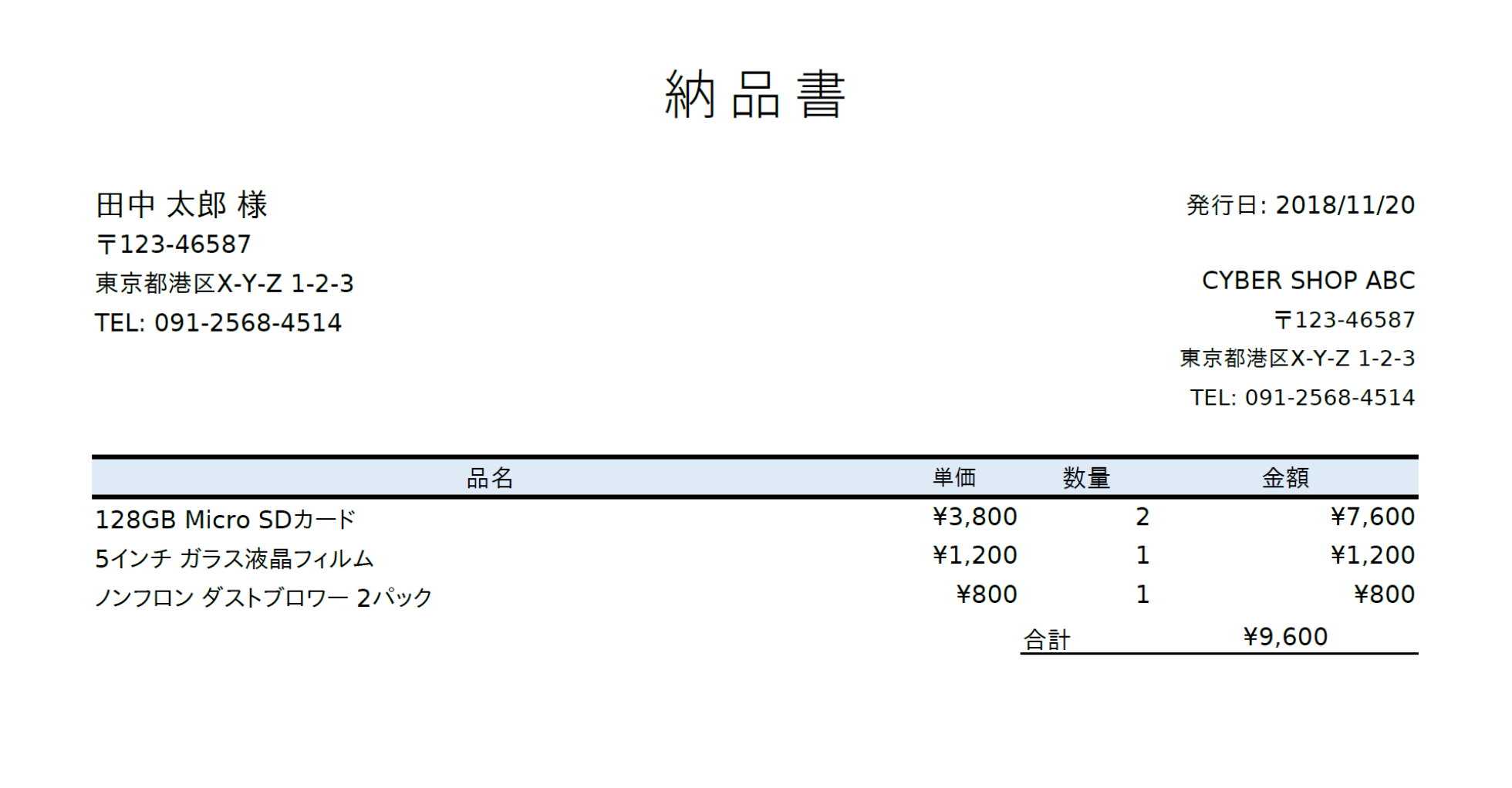
The line-item rows grow or shrink with the number of items in the data.
The sample is a Japanese delivery note, so some strings in the code are Japanese: 様 is an honorific that follows the customer's name, 〒 marks a postal code, and 合計 means "total."
Complete code
The complete implementations
Both approaches use an Excel file as the template.
With Apache POI
For the data, we use the following POJOs. Lombok generates the constructors and accessors.
If you have an ad blocker or a similar browser extension installed, the code below may appear blank.
@Data
@AllArgsConstructor
public class InvoiceData {
    private ContactInfo customer;
    private ContactInfo shop;
    private List<OrderLine> orderLineList;
    private LocalDate issueDate;
}

@Data
@AllArgsConstructor
public class ContactInfo {
    private String name;
    private String address;
    private String zip;
    private String phone;
}


@Data
@AllArgsConstructor
public class OrderLine {
    private String productName;
    private int productPrice;
    private int count;
}

// Sample data
InvoiceData invoice = new InvoiceData(
        new ContactInfo(
                "田中 太郎",
                "東京都港区X-Y-Z 1-2-3",
                "123-46587",
                "091-2568-4514"
        ),
        new ContactInfo(
                "CYBER SHOP ABC",
                "山形県酒田市A-B-C 1-2-3",
                "598-123654",
                "098-15468-41114"
        ),
        orderLines,
        LocalDate.of(2018, 11, 20)
 );
Template
Everything other than the data, such as the structure and design, is set up in advance.
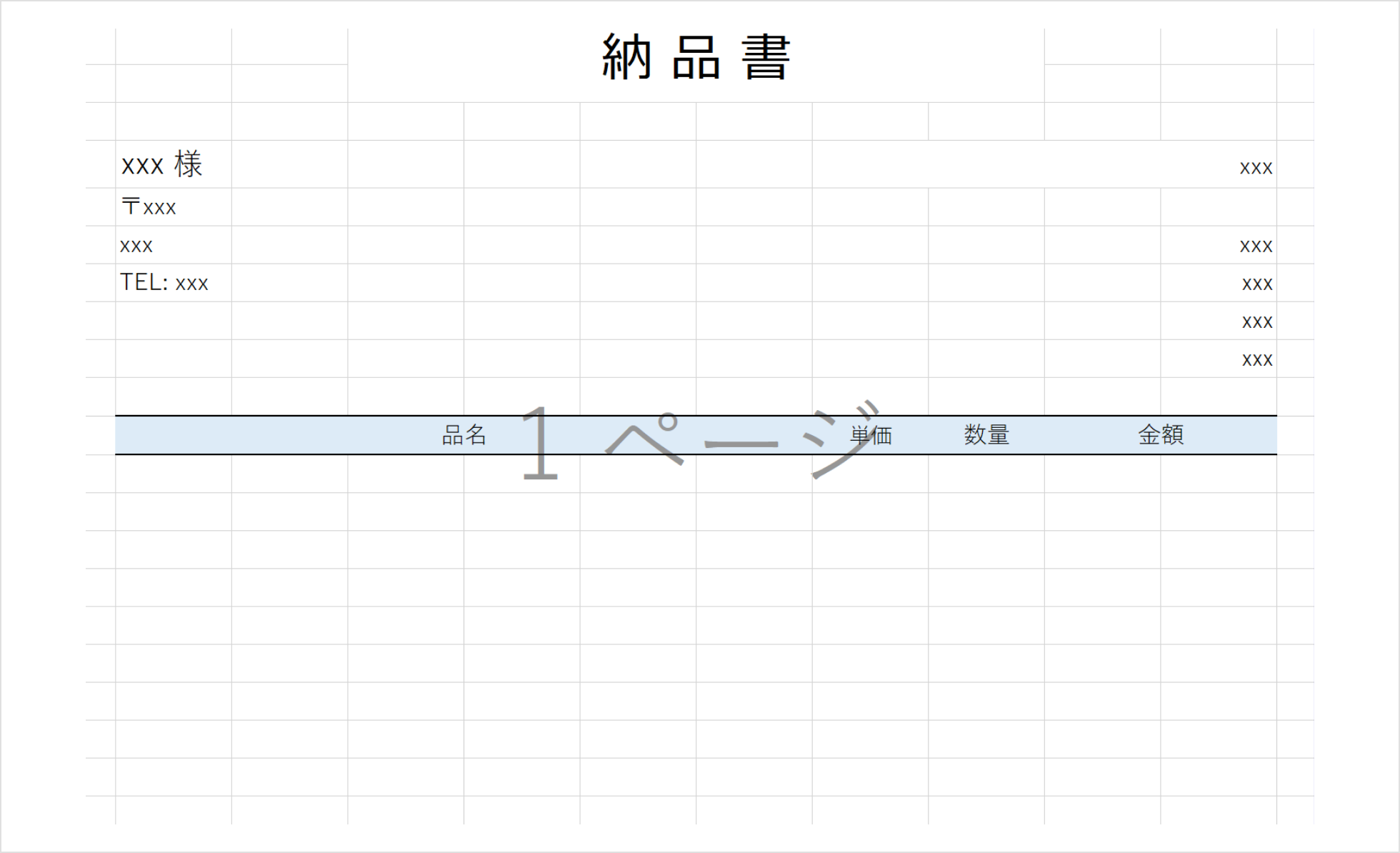
Code that fills in the data
Even a simple delivery note takes this much code.
public static void renderAndSave(String outputPath, InvoiceData data) throws IOException {
    Workbook wb = WorkbookFactory.create(PoiInvoiceRenderer.class.getResourceAsStream("/nouhinsho-poi.xlsx")); // Excel template
    Sheet sheet = wb.getSheetAt(0);

    // Customer
    cellAt(sheet, 4, 2).setCellValue(data.getCustomer().getName() + " 様");
    cellAt(sheet, 5, 2).setCellValue("〒" + data.getCustomer().getZip());
    cellAt(sheet, 6, 2).setCellValue(data.getCustomer().getAddress());
    cellAt(sheet, 7, 2).setCellValue("TEL: " + data.getCustomer().getPhone());

    // Issue date
    cellAt(sheet, 4, 8).setCellValue(Date.from(data.getIssueDate().atStartOfDay(ZoneId.systemDefault()).toInstant()));

    // Shop
    cellAt(sheet, 6, 11).setCellValue(data.getShop().getName());
    cellAt(sheet, 7, 11).setCellValue("〒" + data.getShop().getZip());
    cellAt(sheet, 8, 11).setCellValue(data.getShop().getAddress());
    cellAt(sheet, 9, 11).setCellValue("TEL: " + data.getShop().getPhone());

    // Line items
    int rowIdx = 12;
    CellStyle currencyStyle = wb.createCellStyle();
    DataFormat format = wb.createDataFormat();
    currencyStyle.setDataFormat(format.getFormat("¥#,###"));

    for(OrderLine line : data.getOrderLineList()) {
        // sheet.shiftRows(rowIdx, sheet.getLastRowNum(), 1, true, true); // bug?
        sheet.createRow(rowIdx);
        Row row = sheet.getRow(rowIdx);
        row.createCell(2, CellType.STRING).setCellValue(line.getProductName());
        row.createCell(8, CellType.NUMERIC).setCellValue(line.getProductPrice());
        row.createCell(9, CellType.NUMERIC).setCellValue(line.getCount());
        row.createCell(10, CellType.FORMULA).setCellFormula("I" + (rowIdx + 1) + "*J" + (rowIdx + 1));
        // style
        cellAt(sheet, rowIdx, 8).setCellStyle(currencyStyle);
        cellAt(sheet, rowIdx, 10).setCellStyle(currencyStyle);
        sheet.addMergedRegion(new CellRangeAddress(rowIdx, rowIdx, 10, 11));
        rowIdx++;
    }

    // Total
    sheet.createRow(rowIdx++);
    Row row = sheet.createRow(rowIdx);
    row.createCell(9, CellType.STRING).setCellValue("合計");
    row.createCell(10, CellType.FORMULA).setCellFormula("SUM(K13:K" + (13 + data.getOrderLineList().size() - 1) + ")");
    sheet.addMergedRegion(new CellRangeAddress(rowIdx, rowIdx, 10, 11));

    CellStyle currencyAndBorder = wb.createCellStyle();
    currencyAndBorder.setBorderBottom(BorderStyle.MEDIUM);
    currencyAndBorder.setDataFormat(format.getFormat("¥#,###"));
    cellAt(sheet, rowIdx, 9).setCellStyle(currencyAndBorder);
    cellAt(sheet, rowIdx, 10).setCellStyle(currencyAndBorder);
    row.createCell(11, CellType.STRING);
    cellAt(sheet, rowIdx, 11).setCellStyle(currencyAndBorder);

    wb.write(new FileOutputStream(new File(outputPath)));
    wb.close();
}

private static Cell cellAt(Sheet sheet, int row, int col) {
    return sheet.getRow(row).getCell(col);
}
With Docurain
You can pass the data as JSON in any structure. Here we use JSON with almost the same structure as the POJOs above.
{
    "customer": {
        "name": "田中 太郎",
        "address": "東京都港区X-Y-Z 1-2-3",
        "zip": "123-46587",
        "phone": "091-2568-4514"
    },
    "shop": {
        "name": "CYBER SHOP ABC",
        "address": "山形県酒田市A-B-C 1-2-3",
        "zip": "598-123654",
        "phone": "098-15468-41114"
    },
    "orderLineList": [
        {
            "productName": "128GB Micro SDカード",
            "productPrice": 3800,
            "count": 2
        },
        {
            "productName": "5インチ ガラス液晶フィルム",
            "productPrice": 1200,
            "count": 1
        },
        {
            "productName": "ノンフロン ダストブロワー 2パック",
            "productPrice": 800,
            "count": 1
        }
    ],
    "issueDate": "2018-11-20"
}
Template
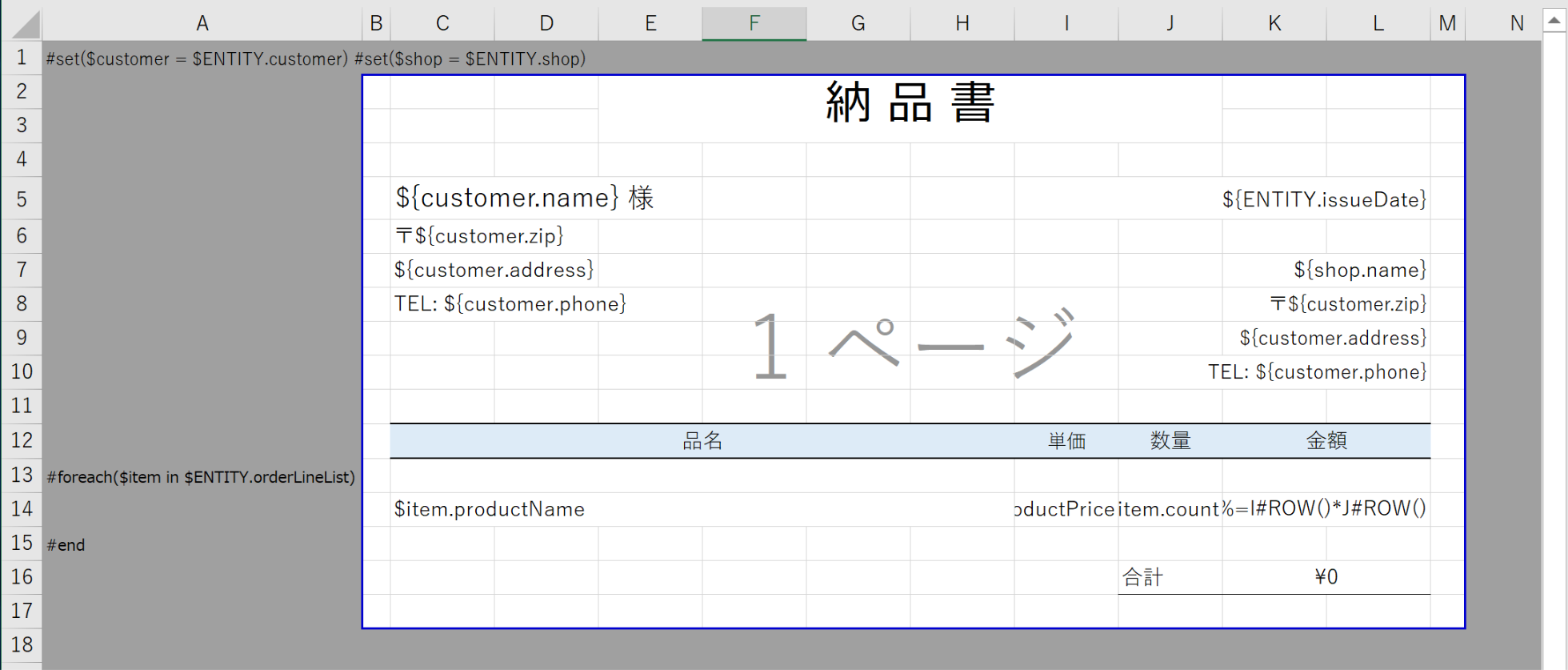
Column A holds Docurain macros, and the document itself holds placeholders that refer to the data. This JSON and this template are all Docurain needs.
The following sections compare the two approaches, one part of the document at a time.
Names and addresses
Names and addresses
Apache POI
Workbook wb = WorkbookFactory.create(PoiInvoiceRenderer.class.getResourceAsStream("/nouhinsho-poi.xlsx"));
Sheet sheet = wb.getSheetAt(0);

// Customer
cellAt(sheet, 4, 2).setCellValue(data.getCustomer().getName() + " 様");
cellAt(sheet, 5, 2).setCellValue("〒" + data.getCustomer().getZip());
cellAt(sheet, 6, 2).setCellValue(data.getCustomer().getAddress());
cellAt(sheet, 7, 2).setCellValue("TEL: " + data.getCustomer().getPhone());

// Issue date
cellAt(sheet, 4, 8).setCellValue(Date.from(data.getIssueDate().atStartOfDay(ZoneId.systemDefault()).toInstant()));

// Shop
cellAt(sheet, 6, 11).setCellValue(data.getShop().getName());
cellAt(sheet, 7, 11).setCellValue("〒" + data.getShop().getZip());
cellAt(sheet, 8, 11).setCellValue(data.getShop().getAddress());
cellAt(sheet, 9, 11).setCellValue("TEL: " + data.getShop().getPhone());
Cells have types. The issue date is displayed in an Excel date format, so the value has to be set as a Date.
Cells can also be null. The code above works because the corresponding cells in the template contain text such as "xxx," so they are not null. For an empty cell, you have to create the cell object first.
For simplicity, we identified each cell by its row and column numbers, but this approach should be avoided for maintainability. It's hard to tell from the code what it does, and when you make a change such as adding a row, it's difficult to see which parts are affected.
Docurain
In Docurain, you just write a placeholder in each cell that takes a value. You can see at a glance which data goes where.
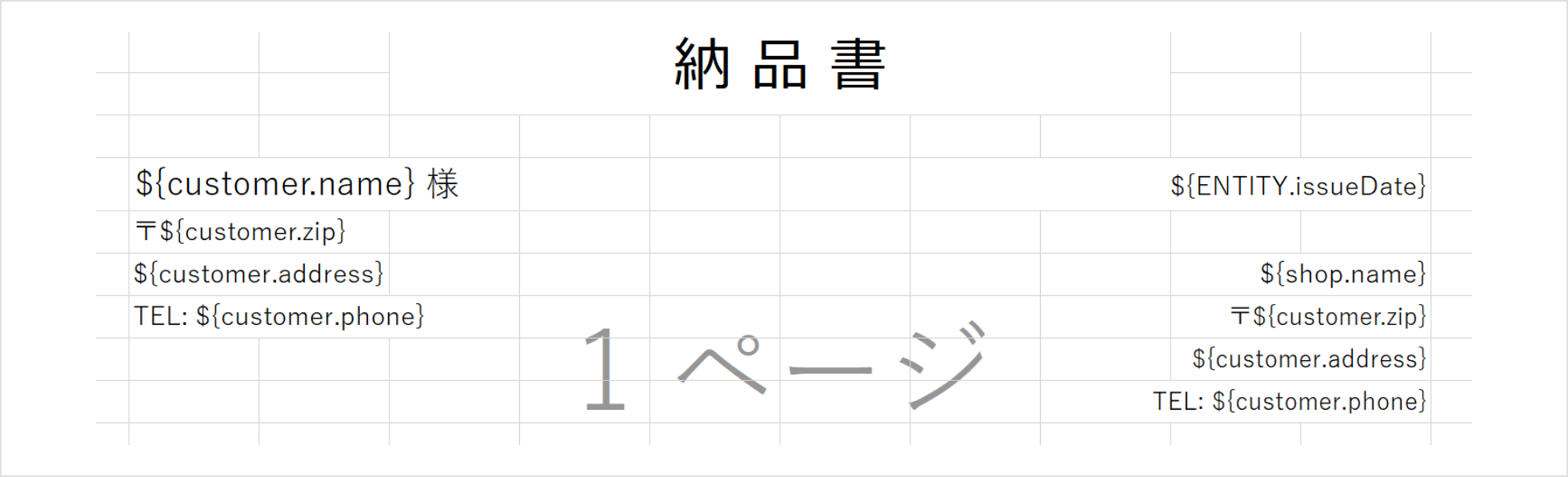
Text such as 様 or 〒 goes directly before or after the placeholder. Docurain detects data types automatically from the JSON values.
Repeating rows
Repeating line items
Apache POI
// Line items
int rowIdx = 12;
CellStyle currencyStyle = wb.createCellStyle();
DataFormat format = wb.createDataFormat();
currencyStyle.setDataFormat(format.getFormat("¥#,###"));

for(OrderLine line : data.getOrderLineList()) {
    // sheet.shiftRows(rowIdx, sheet.getLastRowNum(), 8, true, true); // bug?
    sheet.createRow(rowIdx);

    Row row = sheet.getRow(rowIdx);
    row.createCell(2, CellType.STRING).setCellValue(line.getProductName());
    row.createCell(8, CellType.NUMERIC).setCellValue(line.getProductPrice());
    row.createCell(9, CellType.NUMERIC).setCellValue(line.getCount());
    row.createCell(10, CellType.FORMULA).setCellFormula("I" + (rowIdx + 1) + "*J" + (rowIdx + 1));

    // style
    cellAt(sheet, rowIdx, 8).setCellStyle(currencyStyle);
    cellAt(sheet, rowIdx, 10).setCellStyle(currencyStyle);
    sheet.addMergedRegion(new CellRangeAddress(rowIdx, rowIdx, 10, 11));
    rowIdx++;
}
The code first creates a cell style with a currency format, because Excel bundles borders and number formats into style objects, and each cell refers to one.
We ran into a problem with the line-item rows. To insert one row per item, we tried calling the shiftRows method on line 8 to move the following rows down, and the output was a corrupted Excel file.

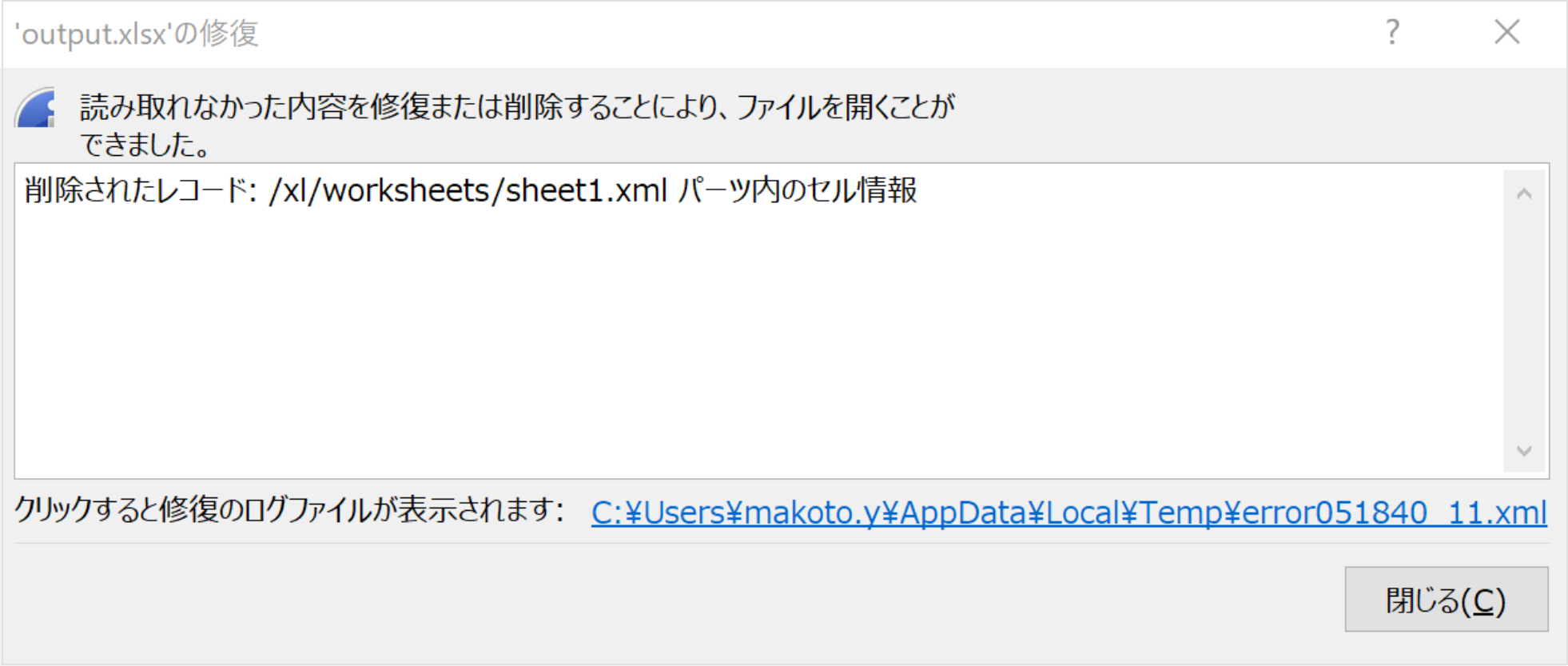
POI often produces invalid Excel files like this. Because you edit the file through a low-level API, anyone using the library also needs to know the Excel file format (Office Open XML).
We looked into it but couldn't find the cause, so we decided to build everything from the line items down in code.
Line 15 enters a formula that calculates the amount from the unit price and the quantity. In Excel, AutoFill would take care of this, but in POI you have to write the formula for each row, working out the cell references from the row number.
Docurain
In Docurain, you can define repeated rows with control statements such as foreach and if.

With this setup, Docurain adds one line-item row for each entry in orderLineList, using the format of row 14 in the template.
The formula for the amount uses the #ROW macro, which returns the current row number.
Total
The total
Apache POI
// Total
sheet.createRow(rowIdx++);
Row row = sheet.createRow(rowIdx);
row.createCell(9, CellType.STRING).setCellValue("合計");
row.createCell(10, CellType.FORMULA).setCellFormula("SUM(K13:K" + (13 + data.getOrderLineList().size() - 1) + ")");
sheet.addMergedRegion(new CellRangeAddress(rowIdx, rowIdx, 10, 11));

CellStyle currencyAndBorder = wb.createCellStyle();
currencyAndBorder.setBorderBottom(BorderStyle.MEDIUM);
currencyAndBorder.setDataFormat(format.getFormat("¥#,###"));
cellAt(sheet, rowIdx, 9).setCellStyle(currencyAndBorder);
cellAt(sheet, rowIdx, 10).setCellStyle(currencyAndBorder);

row.createCell(11, CellType.STRING);
cellAt(sheet, rowIdx, 11).setCellStyle(currencyAndBorder);
Line 5 enters the formula for the total. The row numbers passed to SUM have to change with the number of line items.
From line 8 on, the code applies formatting and a bottom border to the total cells.
Docurain

Docurain supports named ranges. If you assign the name price to the amount cell in the template's line-item row, the price range in the generated document extends across all the line-item rows. So you can calculate the total with SUM(price). You can also specify the rows by number.
Summary
Summary
If you only need a few document layouts and know they'll need little maintenance or only simple changes, hard-coding them with POI will do. Otherwise, you should use a document engine like Docurain.
Building documents with POI is harder than you might expect, and you probably wouldn't want to modify code like the above every time a document changes. Ideally, the document layout should be kept separate from the code.
A mechanism like Docurain's, which defines placeholders, scans every cell, and replaces each placeholder with data, isn't that hard to build yourself. But once it includes control statements such as loops and conditionals, it takes a lot of work.
Documents need many other features as well. For example, a common requirement is to insert page breaks automatically when there are many line items and to show the total only on the last page. You can implement this with POI, but you end up with hard-coded logic for each document, as shown above, which makes maintenance harder.
The biggest burden is that almost every task requires detailed knowledge of Office Open XML and the POI API. What you want is documents, and learning all of that to build your own document engine is not productive.